
Support & Resources
Find answers, get updates, and learn how to make the most of your RiverStreet services, all in one place.

Choose the button below that best describes how we can help.
We’ve put together a guide to provide you with more information on your services and helpful tips on how to ensure you get the best experience possible with RiverStreet.
Safe Digging Starts with 811
Whether you are planting a new garden bed, installing a fence, or setting up a mailbox, any project that involves putting a shovel in the ground requires a quick check with 811. Before you start any digging project on your property, contacting 811 online or by phone is the single best way to keep your home and community safe.
Protect Your Property and Neighbors
Hitting a buried utility line while digging can disrupt essential services like water, electricity, or your high-speed fiber internet connection. It can also incur expensive repair costs or cause serious personal injury. Calling 811 prevents these accidents and ensures local infrastructure remains secure.
Because RiverStreet serves communities across both North Carolina and Virginia, it is important to know the specific safe digging guidelines for your state before you pick up a shovel.
Select Your State for Local 811 Rules
If You Are Digging in North Carolina (NC811):
- Required Advance Notice: You must contact NC811 at least 3 full business days before you intend to begin digging. The three-day clock officially begins at 11:59 p.m. on the day you submit your request.
- The Process: You can call 811 or use the NC811 Single Ticket online portal to submit your request. You will receive a tracking ticket number.
- Confirming Before You Dig: You must wait for all utilities to respond through the Positive Response System (PRN). If a utility provider has not responded by your deadline, you must request a Second Notice or a 3-Hour Ticket before touching the ground.
If You Are Digging in Virginia (VA811):
- Required Advance Notice: You must contact VA811 at least 48 hours in advance of your project. This timeline equals 2 working days, and the official clock begins at 7:00 a.m. on the next working day after your request is submitted.
- The Process: You can call 811 or file a Single Address Ticket (SAT) online through the VA811 web portal.
- Confirming Before You Dig: Virginia state law strictly requires you to check the Positive Response System (WebTM) before digging. You must receive a clear or marked status from every single utility listed on your ticket before it is legally safe to work.
What Happens After the 811 Request?
Once you submit your ticket in either state, the 811 process is entirely free:
- Site Visit: A professional utility locator will visit your home or business.
- Free Location: The locator will identify and map out underground utility lines at no cost to you.
- Clear Marking: They will place colored flags or paint to show you precisely where lines are buried so you can avoid them.
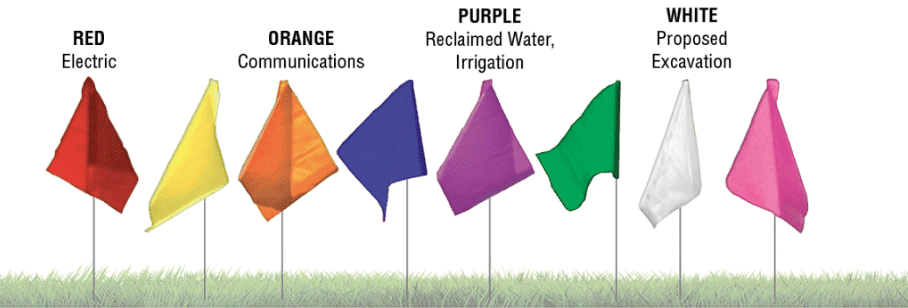
The universal colors shown above tell you exactly what is buried beneath your property. For example, red indicates electric lines, while orange indicates communication lines, which includes the fiber optic cables providing your internet connection. Always dig carefully outside of these marked paths.
Important: Infrastructure Protection and Fees
At RiverStreet, we continuously invest in our fiber network to provide reliable, uninterrupted connectivity to our communities. To protect local infrastructure, property owners or contractors who damage a buried line without a valid, active 811 ticket will be held financially responsible. A standard fee of $249 will be charged if a RiverStreet line is cut or damaged without contacting 811 prior to digging. Taking a few minutes to submit a free request keeps your neighborhood connected and protects you from unnecessary expenses.
Your Trusted Local Partner
At RiverStreet, we care about the safety, reliability, and well-being of the communities we serve. Protecting local infrastructure ensures that everyone stays connected to the digital world when they need it most.
Open Settings: Tap the Settings app on your device.
Go to Accounts: Scroll down and select Passwords & accounts (or Accounts and backup > Manage accounts on Samsung devices).
Add Account: Tap Add account at the bottom of the screen.
Select Account Type: Choose Google for a Gmail address, or Personal (IMAP) / Exchange for other email providers.
Enter Credentials: Type in your email address and password, then tap Next.
Agree to Terms: Review any permissions, complete two-factor authentication if prompted, and tap I agree to finalize the setup.
Go to Mail: Scroll down and select Mail, then tap Accounts.
Add Account: Tap Add Account to view the list of email service providers.
Select Provider: Choose your email provider (e.g., Google, Outlook, Yahoo, or iCloud).
If your provider is not listed, tap Other to enter settings manually.
Enter Credentials: Type in your email address and password, then tap Next. Complete any required two-factor authentication prompts.
Sync & Save: Choose the features you want to sync (ensure Mail is toggled on) and tap Save.
Select a New Provider such as Gmail, Outlook, iCloud, Proton Mail, etc.
Export your Contacts, Emails, and Calendars: Save your address book as a .CSV file.
Forwarding: Set up “Auto-Forward” on your current account.
The “Big Announcement”: Send one final BCC email to your contact list with your new address.
Example: “Please note that my email address has recently changed. Beginning on January 1, 2027 this email address will no longer be monitored. My new email will be name@newemail.com. Thank You!”
Set up Out-of-Office Replies: Remind contacts by sending automated messages about the upcoming changes to your account.
Update Logins: Change your email on high priority accounts (Banking, Healthcare, Utilities, etc.)
Go to Gmail: https://mail.google.com
Start Account Creation: Click the Create account button.
Select Usage: Choose “For my personal use” (or “For work or my business” if needed).
Enter Details: Enter your first and last name, date of birth, and gender.
Choose Username: Create a unique username (e.g., example@gmail.com). If the username is already taken, you may need to try a different one.
Create Password: Select a strong, unique password.
Verify Phone Number: Enter your mobile phone number to verify your account via a 6-digit code provided by Google.
Add Recovery Details (Optional): You can add a recovery phone number or email address, though this step can be skipped.
Agree to Terms: Review Google’s Privacy and Terms and click ” I agree.”
Terms of Payment
The customer assumes responsibility for all charges including exchange service and toll messages originating at the customer’s station and all toll messages received at the customer’s station on which the charges have been reversed with the consent of the person called. If objection in writing is not received by the Telephone Company within thirty days after the bill is rendered, the account shall be deemed correct and binding upon the customer.
What Happens If I Can’t Pay My Bill On Time?
We appreciate the prompt payment of your telephone bill, but if you cannot pay by the due date, call our business office at 336-973-3103 to discuss payment arrangements. Should a customer not pay their bill by the due date listed on the bill and fail to make appropriate payment arrangements, a notice explaining our intent to disconnect service will be given. This notice will be sent out to the customer at least five days prior to the scheduled disconnect date. Service will be disconnected on or after the appointed date should the customer not meet the terms for retaining service.
How To Get Service Restored After Disconnection For Non-Payment
Before service is reconnected, all charges billed for service must be paid or arrangements made for payment. You may also have to re-establish credit which may require an advanced payment and/or deposit. You will also be required to pay a reconnection service fee.
Easy Ways to Pay your Bill
Customers may pay telephone bills in one of six easy ways
Mail your payment with the enclosed return envelope.
Have your payment made by Automatic Draft from your checking account or credit card.
Pay your bill online here
Visit one of our local retail offices. View Here
By Bank Draft
Get Connected. Stay Informed.
Opt in to RiverStreet text alerts and be the first to know about maintenance notices, outages, and more.

Incoming Server:
POP Server Settings (Apple Devices only):
Server: mail.wilkes.net
Port: 995
SSL: Enabled
Username: user@wilkes.net
IMAP Server Settings (Android Devices only):
Server: mail.wilkes.net
Port: 993
SSL: Enabled
Username: user@wilkes.net
Contacts & Calendars
CalDAV Server Settings
Server: mail.wilkes.net
Username: user@wilkes.net
CarDAV Server Settings
Server: mail.wilkes.net
Username: user@wilkes.net
We’ve put together a guide to provide you with more information on your services and helpful tips on how to ensure you get the best experience possible with RiverStreet.
How much bandwidth does your house actually need?
As you use your devices for video chatting, uploading family videos, or playing online games, you may be using more broadband than you realize. To ensure that you have the speed and reliability you need to stay connected and enjoy all your favorite devices, broadband providers are working to upgrade their networks to all-fiber-optic technology. This technology allows for faster and more reliable broadband connections.

SmartTV
1. Choose Wi-Fi and Connect
2. Select Wireless when prompted
3. Pick your Wi-Fi Network from the list
4. If your network is missing, choose Scan again
5. Enter your Wi-Fi password (it is case-sensitive)
Mobile Phone
Connect your device to available Wi-Fi networks, including public, secure, and previously used networks
1. From your Home Screen, go to Settings, then tap Wi-Fi
2. Tap to turn on Wi-Fi. Your device will automatically search for available networks.
3. Tap the name of the Wi-Fi network that you want to join. You might be asked to enter the network’s password first, or agree to terms and conditions. If you don’t know the password to the Wi-Fi network, contact your network administrator.
4. Look for the blue checkmark  next to the network name, and the Wi-Fi icon
 in the upper corner of your screen. This means you’re successfully connected.
Wired Connection
1. Plug one end of the yellow Ethernet cable into your TV or player
2. Plug the other end into your router or modem
3. On screen, choose Wired
4. Follow the on-screen steps to complete setup
Tip: Streaming works best when the TV has a strong Wi-Fi signal or is connected via Ethernet.
For fiber services:
- Check that the power to the router is connected
- Check ethernet connection
- Unplug the ethernet cord and plug it into the W-A-N port. It may also have a symbol that looks like the world.
- Is the power supply plugged into a working outlet?
- Does it have a solid light?
- No: is the outlet working? Try checking with another device like a phone charger or try another outlet.
For copper and coax services:
- Unplug power from both the modem and router
- Plug the modem back up first, wait a full minute to ensure modem is back online
- Plug the router back up and check internet connection
Download the myRiverStreet Managed Wi-Fi App
Get started today by downloading the myRiverStreet App on your device. Easily manage your network, set parental controls, and monitor connected devices—all from the palm of your hand.


My RiverStreet App Support Videos
Need help using the Managed Wi-Fi app? Watch our step-by-step video guides to learn how to set up your network, manage devices, enhance security, and more. Whether you’re a new user or looking for advanced features, these videos will walk you through everything you need to know.
Experiencing slow loading times or video buffering? Run our speed test to check your current download speed, upload speed, and latency. If your speeds are lower than expected, try restarting your router before testing again.
Use this checklist to help improve your home Wi-Fi performance and get the best coverage throughout your home.
Typical interferences:
- Mirror Reflection/Fish Tanks
- Microwaves
- Bluetooth Devices/Baby Monitors/Alexa/Cordless Phones
- Wireless Gaming Controllers
- Concrete/Masonry
- Log Homes
- Metal causes signal to bounce (doesn’t pass through)
Router Placement
- Place your router or Wireless Gateway in a central location
- Keep equipment elevated off the floor
- Avoid placing the router inside cabinets or behind furniture
- Position antennas vertically
Improve Wi-Fi Coverage
- Reduce obstacles between your device and router when possible
- Move frequently used devices closer to the router if needed
- Use Wi-Fi extenders or mesh Wi-Fi systems for larger homes
Improve Device Performance
- Restart your router regularly
- Disconnect unused devices from your network
- Keep smart TVs, gaming consoles, and streaming devices updated
- Ensure devices are connected to the correct Wi-Fi network
Streaming & Gaming Tips
- Limit the number of devices streaming simultaneously during peak Wi-Fi usage
- Use wired Ethernet connections for gaming or work devices when possible
- Pause large downloads during video calls or streaming
Internet Speed Considerations
- Consider your household’s number of connected devices
- Evaluate if your current speed plan matches your usage needs
- Homes with multiple users, remote work, streaming, or gaming may benefit from higher speeds
Troubleshooting Basics
- Reboot your router if connections become slow or unstable
- Check for loose cables or power connections
- Test speeds near the router to compare performance
- Run a speed test on multiple devices
Signs You May Need Additional Wi-Fi Support
- Dead zones or weak signal areas
- Frequent buffering while streaming
- Slow speeds in certain rooms
- Smart home devices disconnecting
- Multiple users experiencing lag at the same time
We’ve put together a guide to provide you with more information on your services and helpful tips on how to ensure you get the best experience possible with RiverStreet.
Station-to-Station Long Distance calls may be made (without a charge to you) to those customers who have 800 service. They offer this service to their customers calling from specific locations. Dial the Access code plus area code plus the special numbers of customers with this service. To reach Directory Assistance for 800 Service dial 800-555-1212.
900 Service: What You Should Know
900 SERVICE IS NOT FREE!
Did you know that consumers can now choose from tens of thousands of 900 services? For a flat fee or for a per-minute charge, you can dial a 900 number to receive stock quotes, weather, sports or software information, health tips for your pet, technical advice on products and sweet talk from a stranger.
You can also dial a 900 number to get ripped off. The adage, “There is no free lunch,” definitely applies to 900 numbers. The more attractive the offer, the more the buyer or caller should be skeptical. The Federal Communications Commission (FCC) has cited credit card services, housing and jobs as potential fraud.
“The 900 pay-per-call service has emerged as one of the most significant vehicles for consumer fraud in recent history” according to a recent report by attorneys general from nine states, the lack of regulation and quick growth in the 900 industry have encouraged fraud.
Remember, making a 900 call is a purchase in itself. The vendor does not require your credit card number of name and address. The charges are billed through the long-distance carriers, with the local telephone company acting merely as the collector.
Wilkes Communications allows customers the option to BLOCK all 1 + 900 calls at NO CHARGE! This could prevent possible unexpected and unpleasant surprises when your telephone bill arrives. You can always have 1 + 900 blocking removed by stopping by our business office if you decide to make calls to a 900 service.
Here are some ways to protect yourself:
- Explain to all family members, especially children, the potential cost and consequences of initiating 900 calls as high as $50 per minute.
- Read (or listen for) the fine print. Per-call charges could be as high as $50 a minute.
- Never call a 900 number unless you know the price of the call, including the cost per minute and the maximum number of minutes the call may last.
- Beware of requests to verify your credit card number.
Most 900 companies are legitimate ventures. Industry analysts expect this industry to double in size in the next few years as new information providers enter to serve the consumer and business markets.
In keeping with this growth, the FCC, Congress and many states are currently formulating policy to regulate the burgeoning 900 industry. Some of the regulations recently passed include a message from the 900 service provider that notifies the customers of all charges and description of the service and gives them the opportunity to hang up without obligation.
Wilkes Telephone Membership Corporation; dba Wilkes Communications, Inc.; Dba RiverStreet Networks; including all of its affiliates (hereinafter referred to as “RiverStreet”)
Customer Notice of 911 and E911 Service Limitations
PLEASE READ THIS NOTICE CAREFULLY
As a user of RiverStreet, session initiation protocol (“sip”) based voice over internet protocol (“VoIP”) services, you are required to agree that you have read and understand the limitations associated with the 911 and e-911 emergency services available through RiverStreet calling services. If you do not agree, you are not authorized to use RiverStreet VoIP calling services.
Caution labels will be provided to you (see example below). Please, place them on or near any devices that are used with or connected to RiverStreet VoIP service.
LIMITATIONS ASSOCIATED WITH THE 911 AND E-911 EMERGENCY SERVICES
Definitions — Terms capitalized when used within this document have the following meanings:
“911 Services” means functionality that allows end users to contact emergency services by dialing the digits 9-1-1.
“Enhanced 911 Service” or “E911” means the ability to route an emergency call to the designated entity authorized to receive such calls, which in many cases is a Public Safety Answering Point (“PSAP”), serving the Customer’s registered or user-provided address and to deliver the user’s telephone number and registered address information automatically to the emergency operator answering the call.
“Basic 911 Service” means the ability to route an emergency call to the designated entity authorized to receive such calls serving the Customer’s registered or user-provided address. With basic 911, the emergency operator answering the phone will not have access to the caller’s telephone number or address information unless the caller provides such information verbally during the emergency call.
With Enhanced 911 Service (“E911”), when a caller from your registered location dials the digits 9-1-1 from any RiverStreet offered calling service that is associated with a phone number and a properly registered address, the phone number and address are automatically presented to the local emergency center serving the location. Emergency operators will have access to this information regardless of whether the caller is able to verbally provide such information. With Basic 911 Service, when a caller from your registered location dials the digits 9-1-1, the call is sent to the local emergency center serving that location. Operators answering the call will not have automatic access to the caller’s call-back telephone number or the associated registered address, even if that address has been properly registered, because with Basic 911 Service the emergency center is not equipped to receive, capture or retain the telephone number associated with the RiverStreet calling service or the registered address. Accordingly, callers must be prepared to provide both call-back and address information. If the call is dropped or disconnected, or if the caller is unable to speak, the emergency operator answering the call will not be able to call the caller back or dispatch help to the caller’s address if call-back and address information has not been provided by the caller.
Limitations
The limitations detailed below are applicable to all of RiverStreet’ calling services (which include but are by no means limited to: VoIP, SIP Origination/Termination, Box set, FreePBX/SipStation, and Hosted IP-PBX).
Customer agrees to inform all users of RiverStreet’ calling services of the potential complications arising from the delivery of emergency services when dialing 911. Specifically, Customer acknowledges and agrees to inform all employees, guests and other third persons who may use RiverStreet’ VoIP calling services of the limitations detailed below associated with all of RiverStreet’ emergency calling capabilities.
RiverStreet’ VoIP Calling Services Have 911 Capabilities that are Different From Those Offered by Traditional Providers of Local Telephone Services:
Customer acknowledges and agrees that VoIP calling services are Internet based and that the 911 calling capabilities associated with VoIP calling services are different from those offered by traditional local telephone services. RiverStreet’ VoIP calling services are not meant to be relied upon in the case of an emergency. While RiverStreet attempts to provide access to emergency service, these VoIP services are not intended to be used to support or to carry emergency calls to any type of hospitals, law enforcement agencies, medical care units or any other kind of emergency services. YOU SHOULD MAINTAIN AN ALTERNATIVE MEANS OF CALLING EMERGENCY SERVICES.
911 Service Will NOT Work If You Experience A Power Outage, Service Outage or Any Other Network Disruption
Outages of your electricity and problems with your connection, including network congestion, will disrupt VoIP calling service and you will not be able to use it for 911 emergency calling.
911 Service Will NOT Work If Your Service Is Disconnected Or You Experience an Outage For Any Reason.
If you have a service outage due to a suspension of your account due to billing issues or for any other reason, you will not be able to use any RiverStreet calling services for any calls, including for emergency 911 calls.
You May Not Be Able to Reach the Correct Emergency Services If You Have A Telephone Number That Does Not Match Your Actual Geographic Location
VoIP services are technically capable of being used in locations that are not associated with the traditional geographic area of a telephone number. These capabilities can cause 911 problems, however. All 911 capabilities will only be available in the location that you have associated with the particular assigned direct-inward-dial (“DID”) telephone number assigned to the Customer. For Basic 911 Services or E911 to be accurately routed to the appropriate emergency call center, the Customer must provide accurate DID telephone numbers as the call-back telephone number for all 911 calls and accurate address information. Additionally, if you are using the service in a location that uses a different area code than the area code in the number you are using with your VoIP service, when you dial 911 you may not be able to reach any emergency personnel. Even if you do reach emergency personnel, your call may not reach the emergency personnel near your actual physical location and the emergency personnel may not be able to transfer your call or respond to your emergency.
You May Not Be Able to Reach the Correct Emergency Service Center If You Fail to Register A Valid Service Address
Failure to provide a correct physical address in the correct format may cause all Basic 911 Service or E911 calls to be routed to the incorrect local emergency service provider. Furthermore, use of RiverStreet calling service from a location other than the location to which such service was ordered, i.e., the “primary registered address,” may result in Basic or Enhanced 911 calls being routed to the incorrect local emergency service provider.
You May Not Be Able to Reach the Correct Emergency Services If You Move Your Phone to a Location Different from the Address You Initially Registered
It is important that you register accurate location information every time you move the equipment associated with your RiverStreet account. If you move your RiverStreet equipment to another location without reregistering, when you dial 911, you may not be able to reach any emergency personnel. Even if you do reach emergency personnel, if you have not provided valid location information you will not be calling the emergency personnel near your actual location and this emergency personnel may not be able to transfer your call or respond to your emergency.
You May Not Be Able to Reach the Correct Emergency Services If You Fail to Accurately Register or Reregister Your New Location or Call 911 Within 72 Hours of Updating Your Location
It is important that you register an accurate location when you initiate your service and every time you move the equipment associated with your RiverStreet account. When you change your location, it may take up to 72 hours for your location change to be reflected in our records. During that time, you may not be able to reach the correct emergency services center or any emergency service provider by dialing 911.
VoIP Calling Services Allow One Emergency Service Address to be Associated with Each Telephone Number.
Certain VoIP calling services do not have a telephone number associated with them but allow for placing and receiving calls. Customers may choose to buy calling services from RiverStreet that have a telephone number but then use a VoIP device to allow multiple users to place and receive calls using one telephone number. Customers must use the VoIP device and the RiverStreet VoIP calling service that has a telephone number associated with it from the same location. Using a service that does not have a telephone number in a remote location will result in the wrong address information being sent in the event of placing an emergency call by dialing 911. The emergency call operator may not be able to transfer the call to appropriate emergency call operators. In the event that Customer intends to use RiverStreet VoIP calling services in multiple locations, at least one telephone number will be required for each location. You acknowledge and agree to this limitation and agree that you will obtain at least one telephone number for each location associated with the RiverStreet calling service.
RIVERSTREET UNDERSTANDS THAT YOU HAVE READ AND UNDERSTAND THE LIMITATIONS ASSOCIATED WITH THE 911 AND E-911 EMERGENCY SERVICES AVAILABLE THROUGH THE VoIP CALLING SERVICES.
Any obligations that may be imposed by federal and state law on operators of private branch exchange or multiline telephone systems are obligations imposed on you, the Customer, and not on RiverStreet.
Auto Attendant
- Dial by Name Directory
- Intro Greeting
- Dial by Extension
General Call Queue Settings
- Call Recording
- Message to Agent
- Require Agents
- Intro Greetings
Conferencing (Dedicated Bridge)
- Leader Login
- Leader PIN
- Participant PIN
- Require Leader to Start
Intercom
- Hands-free intercom between two extensions
EPAX
- Electronic Fax to email
Call Forwarding
- Forward calls to another extension, cell phone, etc.
Call Transfer
- Blind and attended transfer
Call Spam Filtering
- Attempts to block unwanted SPAM calls
Music on Hold
Call Waiting
Call Queues
- Max Queue Length
- Queue Ring Timeout
- Agent Ring Timeout
Call Queue Routing
- Round Robin (longest idle)
- Ring All
- Forward if Unavailable
- Forward if Unanswered
Paging
- Handset Paging
- Overhead Speaker Paging
Intercom
- Hands-free intercom between two extensions
Voicemail
- Voicemail to email
Call Pickup
- Directed Call Pickup
Cell Phone App
- App for iPhone and Android that ties to the user’s extension
Time Frames
- Business/After Hours/Holiday Scheduling
Call Park
Call Retrieve
Call History
Wilkes Telephone Membership Corporation; dba Wilkes Communications, Inc.; Dba RiverStreet Networks; including all of its affiliates (hereinafter referred to as “RiverStreet Networks”)
RiverStreet Networks E911 Waiver
Re-Registration Required if You Change Your Number or Add or Port New Numbers 911 service does not function if you change your phone number or if you add or port new phone numbers to your account. Unless and until you successfully register your location of use for each changed, newly added or newly ported phone number and receive confirmation from RiverStreet Networks.
Confirmation of Activation Required
Your 911 service will not be activated for any phone line that you are using with the Service, unless and until you receive an email from RiverStreet Networks confirming that the 911 service has been activated for that primary phone number. The activation may take up to three days to complete.
Service Outages
You acknowledge and understand that the Service and 911 Service does not function in the event of power failure. Should there be an interruption in the power supply, the Service and 911 Service will not function until power is restored. A power failure or disruption may require the Customer to reset or reconfigure the Device and other CPE equipment prior to using the Service and 911. You also acknowledge and understand that the Service and 911 Service requires a fully functional broadband connection to the Internet (which is not provided by RiverStreet Networks) and that, accordingly, in the event of an outage of, or termination of broadband service with or by your Internet service provided (“ISP”) and/or broadband provider, the Service and 911 Service will not function. If there is an interruption in the power supply and/or an ISP/broadband outage, the Service and 911 Service will not function until the power supply is restored and/or the ISP/broadband outage, fixed You acknowledge that RiverStreet Networks is not responsible for any service outages related to the loss of electrical power, connectivity.
Suspension or termination by your broadband or Internet service provider, the blocking of ports by you broadband or Internet service provider, suspension or termination of you RiverStreet Networks Services/Account or any failures resulting from local or national disasters.
Disclaimer of Liability and Indemnification
You acknowledge and understand that RiverStreet Networks will not be liable for any Service outage and/or inability to dial 911 using the RiverStreet Networks Service or to access emergency service personnel due to the characteristics and limitation of the RiverStreet Networks Service as set forth in this document. You agree to defend, indemnify, and hold harmless RiverStreet Networks, its officers, directors, employees, affiliates, and agents and any other service provider who furnishes services to you in connection with the Service, from any and all claims, losses, dames. Fines. Penalties. Costs. And expenses (including without limitation. Reasonable attorney fees) by, or on behalf of. You or any third-party user of the Service relating to the failure or outage of the Service. Including those related to the 911 service.
In addition, RiverStreet Networks does not have any control over whether. Or the manner in which, calls using the 911 service are answered or addressed by any local emergency response center. RiverStreet Networks disclaims all responsibility for the conduct of local emergency response centers and the national emergency calling center. RiverStreet Networks disclaims all responsibility for the conduct of local emergency response centers and the national emergency calling center. RiverStreet Networks relies on third parties to assist us in routing 911 service calls to local emergency response centers and to a national emergency call center. RiverStreet Networks disclaims any and all liability or responsibility in the event such third party data used to route calls is incorrect or yields an erroneous result. Neither RiverStreet Networks nor its officers, directors, employees, affiliates. And agents and any other service provider who furnishes services to you in connection with the Service may be held liable for any claim, damage, or loss. And you hereby waive any and all such claims or causes of action. Arising from or relating to the 911 service unless such claims or causes of action arose from RiverStreet Networks gross negligence, recklessness or willful misconduct. You shall defend, indemnify, and hold harmless RiverStreet Networks, its officers, directors, employees, affiliates and agents and any other service provider who furnishes services to you in connection with the Service, from any and all claims, losses, damages. Fines. Penalties. Costs and expenses (including, without limitation, attorneys’ fees) by, or on behalf of, you or any third party relating to the absence, failure or outage of the Service, including 9011 service, incorrectly routed 911 service calls, and/or the inability of any user of the Service to be able to use 911 service or access emergency service personnel.
Furthermore, you acknowledge that RiverStreet Networks does not offer Lifeline service, and that if you are not comfortable with the limitations of the 911 service, RiverStreet Networks strongly recommends that you always have an alternative means of accessing emergency service.
PLEASE READ THIS INFORMATION REGARDING 911 VERY CAREFULLY. BY ACTIVATING AND PAYING FOR THE SERVICE, YOU ACKNOWLEDGE AND AGREE TO THE LIMITATIONS OF RIVERSTREET NETWORKS’ 911 EMERGENCY DIALING SERVICE AND UNDERSTAND THE DISTINCTIONS BETWEEN SUCH SERVICE AND TRADITIONAL 911 OR E911 CALLS.
- 911 SERVICE DOES NOT WORK IF YOU FAIL TO REGISTER OR UPDATE THE 911 SERVICE WITH YOUR CURRENT LOCATION
- 911 SERVICE WILL NOT WORK IF THERE IS AND ELECTRICAL OR INTERNET SERVICE OUTAGE DUE TO ANY CAUSE
- 911 SERVICE WILL NOT WORK IF YOUR SERVICE HAS BEEN CANCELLED BY YOU OR TERMINATED BY RIVERSTREET NETWORKS
- YOU INDEMNIFY FAMEWOOD FOR ANY FAILURE IN THE 911 SERVICE
Most of RiverStreet Networks customers in the U.S., including Alaska and Hawaii, have access to basic 911 or Enhanced 911 (E911) service. Enhanced 911 (E911) service is available for all
U.S. customers who register a valid E911 service address.
With E911 service, when you dial 911, your telephone number and registered address is simultaneously sent to the local emergency center assigned to your location, and emergency operators have access to the information they need to send help and call you back if necessary. If you live in locations where the emergency center is not equipped to receive your telephone number and address, you have basic 911. With basic 911, the local emergency operator answering the call will not have your call back number or your exact location, so your exact location. So you must be prepared to five them this information. Until you give the operator your phone number and location, he/she may not be able to call you back or dispatch help if your call is not completed or is not forwarded, is dropped or disconnected, or if you are unable to speak.
As additional local emergency centers become capable of receiving our customers’ telephone number and address information, customers will need to register a valid E911 service address to upgrade the service to E911. RiverStreet Networks will not inform you that new local emergency centers have been added. If your address is not covered by E911 service, RiverStreet Networks advises you to attempt to register your address periodically to determine if a new local emergency center has been added to your area.
Certain customers do not have access to either basic 911 or E911 because there are no local emergency centers in their area or they did not register for an E911 service address. If you do not have access to basic 911 or E911, your 911 call will be sent to the national emergency call center. A trained agent at the emergency call center will ask for the name, telephone number and location of the customer calling 911, and then contact the local emergency center for such customer in order to send help.
Emergency personnel do not receive your phone number or physical location when your 911 call is routed to a national emergency call center. Therefore, you must be prepared to give the operator your phone number and location and any other information that the operator might request. You authorize the national emergency call center to disclose your name and address to the third party or parties involved with providing emergency services to you. Including, without limitation, call routers, call centers and local emergency centers.
Notify All Users
Customers are responsible for informing any household residents, guests and other third persons who may be present at the physical location where you utilize the 911 service of the important differences in and limitations of 911 service as compared with traditional 911 landline or cell phone service.
Registration of Physical Location Required
For each primary phone number that you use for the Service, you must register with RiverStreet Networks the physical location where you will be using the Service with that phone number.
When you move the Device to another location, you must register you new location. If you do not register your new location, and 911 calls you make using the 911 service may be sent to an emergency center near your old address. You must register your initial location of use when you subscribe to the Service.
Thereafter, you may register a new location by following the instructions from the “911” registration link in your RiverStreet Networks Account Portal. For purposes of the 911 service, you may only register one location at a time for each primary phone line you use with the Service.
As a subscriber to our fiber optic services, we want you to be familiar with our battery backup unit and its purpose. The intent of the backup battery is to ensure home phone service remains available during a brief power outage for up to eight hours of emergency use. Upon request, a 24-hour extended battery may be purchased at the consumer’s expense. The battery is approximately one pound and roughly the size of a brick. Batteries should be replaced every 3-5 years. If a battery is no longer working, you will be alerted with a consistent beeping sound coming from the battery unit.
Self-testing should be done at least once a month, especially in locations with poor cell phone reception, residences with elderly customers, and/or illness in the home that could warrant an emergency. To self-test, unplug the battery unit from its outlet. Doing so will put your service on battery backup. Your internet and IPTV service will be interrupted while on battery backup. However, you should still have a dial tone on a regular landline phone that does not use a power source. Please keep in mind, cordless phones will not work as they require a power source.
*Note: If your landline phone is not working, your battery backup unit may need to be replaced. Please contact us at 844.238.0131 to determine if a replacement is necessary.
International calling may be made directly from many local telephone exchanges. If international direct dialing is available in your area dial “011” – Country Code (see below) – City Code – Local Telephone Number. Pressing the “#” button at the end of the number you are dialing helps connect your call faster. An example call to Naples, Italy would be dialed as follows:

Helpful Links for International Calling
FCC International Calling Tip Sheet
The FCC’s Consumer Guide for International Calling Tips has useful information such as a calling checklist, Basic Rates, and web resources.
CountryCode.org
CountryCode.org is your complete guide to call anywhere in the world. The calling chart provided will help you find the dialing codes you need to make long-distance phone calls to friends, family, and business partners around the globe.
Telephone Rates for International Calls
Find outgoing international calling rates for Wilkes and RiverStreet telephone service customers.
*Calls terminating on mobile phones or other wireless devices will have an additional Mobile Termination charge of $1.27 per minute.
| Country | Country Code | Region | Rate |
| ALGERIA N | 2139 | NGN | $ 0.9804 |
| ANGOLA | 244 | Standard | $ 0.1819 |
| ARGENTINE | 54 | Standard | $ 0.1694 |
| BRAZIL M | 55 | Mobile | $ 0.2747 |
| BRUNEI | 673 | Standard | $ 0.2053 |
| BRUNEI M | 6737 | Mobile | $ 0.2053 |
| CHILE M | 569 | Mobile | $ 0.2500 |
| CHINA | 86 | Standard | $ 2.8240 |
| CHINA M | 8613 | Mobile | $ 2.8240 |
| COSTA RICA | 506 | Standard | $ 0.1020 |
| CYPRUS | 357 | Standard | $ 0.3146 |
| ESTONIA | 372 | Standard | $ 0.6504 |
| FRANCE | 372 | Standard | $ 0.2700 |
| FRENCH DPTS | 262 | Standard | $ 1.0440 |
| GEORGIA | 9954 | Standard | $ 0.5333 |
| GERMANY M | 4915 | Mobile | $ 0.4438 |
| GUADELOUPE | 590 | Standard | $ 0.3732 |
| HONG KONG | 852 | Standard | $ 0.1080 |
| HONG KONG M | 8521 | Mobile | $ 0.1080 |
| IRAQ | 964 | Standard | $ 0.5268 |
| ITALY N | 397 | NGN | $ 0.1320 |
| KAZAKSTAN | 771 | Standard | $ 0.2100 |
| LIECHTENSTE | 423 | Standard | $ 0.8400 |
| MACAO | 853 | Standard | $ 0.2880 |
| MACAO M | 8536 | Mobile | $ 0.2880 |
| MALAWI | 265 | Standard | $ 1.5240 |
| MARTINIQUE | 596 | Standard | $ 0.4920 |
| MEXICO | 52 | Standard | $ 0.1254 |
| MEXICO M | 521758 | Mobile | $ 0.3174 |
| MEXICO S | 5220 | Standard | $ 0.3174 |
| MONGOLIA | 976 | Standard | $ 0.2136 |
| MONGOLIA M | 97676 | Mobile | $ 0.2136 |
| MONGOLIA N | 9768 | NGN | $ 0.2136 |
| NEW ZEALAND | 64 | Standard | $ 0.0695 |
| NEW ZEALANDM | 642 | Mobile | $ 0.3420 |
| PERU | 51 | Standard | $ 0.0720 |
| PERU M | 519 | Mobile | $ 0.2906 |
| ROMANIA | 40 | Standard | $ 0.2605 |
| ROMANIA M | 407 | Mobile | $ 0.2605 |
| SAO TOME | 239 | Standard | $ 4.0440 |
| SINGAPORE M | 658 | Mobile | $ 0.3565 |
| SLOVAK REPU | 421 | Standard | $ 0.0540 |
| SPAIN | 34 | Standard | $ 0.2988 |
| SUDAN M | 2491 | Mobile | $ 0.4666 |
| SWITZERLAND | 41 | Standard | $ 0.0959 |
| ZIMBABWE | 263 | Standard | $ 0.4200 |
The telephone is one of the safest appliances in your home or office; however, telephone users shoulder be cautious in some instances:
- Do not use the telephone while you are in the bathtub, shower, or swimming pool.
- Avoid using the telephone during electrical storms in your immediate area.
- If you suspect a gas leak, report it immediately but use a telephone away from the area in question.
North Carolina has a law that will help residential customers handle telemarketing calls. This is what the law says:
- At the beginning of each call, the telemarketer must clearly identify himself and the business or entity that he represents.
- At your request, the telemarketer must provide you with a telephone number or address where you can reach him.
- You may request to have your name removed from the telemarketer’s calling list, and the telemarketer must take all necessary steps to remove your name and telephone number from the list.
- No telemarketer may call your home after 9:00 PM or before 8:00 AM.
- No telemarketer may knowingly use any method to block the display of his number on your Caller ID box.
- This law does not apply to telemarketing calls made by or on behalf of tax-exempt, nonprofit organizations or to telemarketing calls made to business customers.
HOW TO REDUCE THE NUMBER OF CALLS PLACED TO YOUR HOME
If a telemarketer calls you, you can ask that your name be removed from their calling list and placed on the DO NOT CALL LIST and the telemarketer must comply. Your request should stop all calls from the person or business that placed the call.
You might have to repeat this request whenever you reach out to the Telephone Preference Service, which maintains lists of consumers who opt out of receiving calls from telemarketers and shares them with commercial entities. You can request that your name be added to the list of those consumers who do not wish DMA is:
Telephone Preference Service
Direct Marketing Association
P.O. Box 9014
Farmingdale, New York 11735-9014
When writing, please include your name, home address, home telephone number (with area code) and your signature to ensure that your request is handled properly. Names remain on file for five years, after which time you may send another request. There is no charge for this service.
National Do Not Call Registry
You may also sign up for the Do Not Call Registry. The Do Not Call Registry is a list of residential and cellular telephone numbers that telemarketers may not call, except in limited circumstances. The Registry is operated by the Federal Trade Commission (FTC) and enforced by the North Carolina Attorney General, the Federal Communications Commission (FCC) and the FTC. Placing your number on the Registry will stop most, but not all, telemarketing calls. By law, exceptions to the Registry include companies with which you have had a business relationship in the past 18 months or to which you have made an inquiry in the past 3 months, non-profit organizations, political organizations and polling firms. The Registry also does not apply to business-to-business calls.
HOW TO SIGN UP FOR THE DO NOT CALL REGISTRY
Signing up for the Registry is free and easy. To register by phone, call 888-382-1222 from the phone you wish to register. To register online, go to https://www.donotcall.gov/. You must have an active e-mail address to register through the Internet and you will receive a confirmation e-mail as part of the registration process. Registration will be valid for 5 years, after which time you can re-register.
More Information Here: https://www.donotcall.gov/
Troubleshooting Outbound Calls Marked as Spam
Due to the rise of unwanted calls in recent years, many services have been created to create databases of known or suspected spam callers. Each service utilizes its own methodology for what numbers they add to the database. Some common methods include:
- The frequency of calls received from your number
- The length of calls associated with your number
- The age of call history for calls received from your number
- The destination area codes for calls received from your number
Based on the various factors, the receiving carrier may choose to add your number to their database for an unknown amount of time. While your number is in their database, calls from your number to their subscribers will be marked as “Spam”. There is no centralized database or service that can be checked to determine if your number will be marked as spam.
Note: There are caller ID reputation companies that monitor your number for a monthly fee. We do not have any relationship with any of these companies, nor can we recommend any.
What to Do if Your Number Is Marked as Spam
You must remember that the spam marking is currently affected by the receiving carrier. Similarly, just because your number shows as spam with one carrier, does not mean it will show as spam for all carriers. If your number shows as a suspected spam caller, you will need to find out who the receiving carrier is and contact them for removal. Many services have online forms for removal. We have listed some below.
Sites to Report Errors
- Free Call Registry – https://www.freecallerregistry.com/fcr/
- AT&T – https://hiyahelp.zendesk.com/hc/en-us/requests/new?ticket_form_id=824667
- T-mobile – https://callreporting.t-mobile.com/
- Verizon – https://www.voicespamfeedback.com/vsf/
Third-Party Services
There are also third-party services that focus on Caller ID reputation. We do not use, nor do we have any relationships with any of these companies. But you are welcome to examine if they would be of value to you. A free option is listed below.
- CallTransparency – https://www.calltransparency.com/
- Hiya – https://www.hiya.com/
Wilkes – Saluda – Barnardsville – Fair Bluff – Stokes, NC
From Home Phone
- #11 – Default Pin # 0000
Remote Access
- Wilkes and Stokes: 336-973- MAIL (6245)
- Saluda: 828-749- MAIL (6245)
- Barnardsville: 828-626-MAIL (6245)
- Fair Bluff: 910-649-5000
Ellerbe, NC
From Home Phone
- Dial 910-652-6061 – Press # – Default Password 0000
Remote Access
- Dial 910-652-6061 – enter your telephone number with area code – # – Default Password 0000
Gretna, VA
From Home Phone
- 656 & 927 Exchange
- Dial 656-1000 – Default Pin 0000 – #
- 324 & 335 Exchange
- Dial 324-1000 – Default Pin 0000 – #
Remote Access
- 656 & 927 Exchange
- Dial 434-656-1000 – MailBox # is the home phone # w/ area code – Default Pin 0000 – #
- 324 & 335 Exchange
- Dial 434-324-1000 – MailBox # is the home phone # w/ area code – Default Pin 0000 – #
Belhaven, NC
From Home Phone
- Dial 252-964-9200 – Default Pin 0000 – #
- or Press *82 from your home phone
Remote Access
- Dial 252-964-9200 – MailBox # is the home phone # w/ area code – Default Pin 0000 – #
Amelia, VA
Effective October 28, 2025
From Home Phone
- Dial 804-561-6245 – Default Pin 0000 – #
- or Press *95 from your home phone
Remote Access
- Dial 804-561-6245 – MailBox # is the home phone # w/ area code – Default Pin 0000 – #
New Castle, VA
Effective October 28, 2025
From Home Phone
- Dial 540-864-8500 – Default Pin 0000 – #
- or Press *95 from your home phone
Remote Access
- Dial 540-864-8500 – MailBox # is the home phone # w/ area code – Default Pin 0000 – #
We’ve put together a guide to provide you with more information on your services and helpful tips on how to ensure you get the best experience possible with RiverStreet.

Standard SIP Phone System

Touch Screen SIP Phone System
Download the RiverStreet SmartBiz Managed Wi-Fi App for Business Customers
Get started today by downloading the RiverStreet SmartBiz App on your device. Easily manage your network, set network resilience, set a point of sale network, and more—all from the palm of your hand.
Download Now:
RiverStreet SmartBiz App Support Videos
Need help using the business customer Managed Wi-Fi app? Watch our step-by-step video guides to learn how to set up your network, manage devices, set up guest networks, enhance security, and more. Whether you’re a new user or looking for advanced features, these videos will walk you through everything you need to know.
Customer Service You Can Depend On
Trusted by local customers and backed by 5-star reviews.
“My local technician, in Fair Bluff, Mr. Dale, is very nice and provides great customer service!”

“Ms Amanda assisted me with my phone and internet bill. I just wanted to say that she did an excellent job. She knew her job and she was more than what I expected as a customer.

“Had installation today by Justin. He was polite and respectful and competent. Well done.”

“Ashley did an excellent job with assisting me. She knew her job well. And overall, I rate her excellent.”
“Danny did a wonderful job repairing our service. His work was very clean and did an amazing job.”
“I just wanted to call and give big remarks to Cameron. He was a big help today. He helped me out a lot”